 insMind
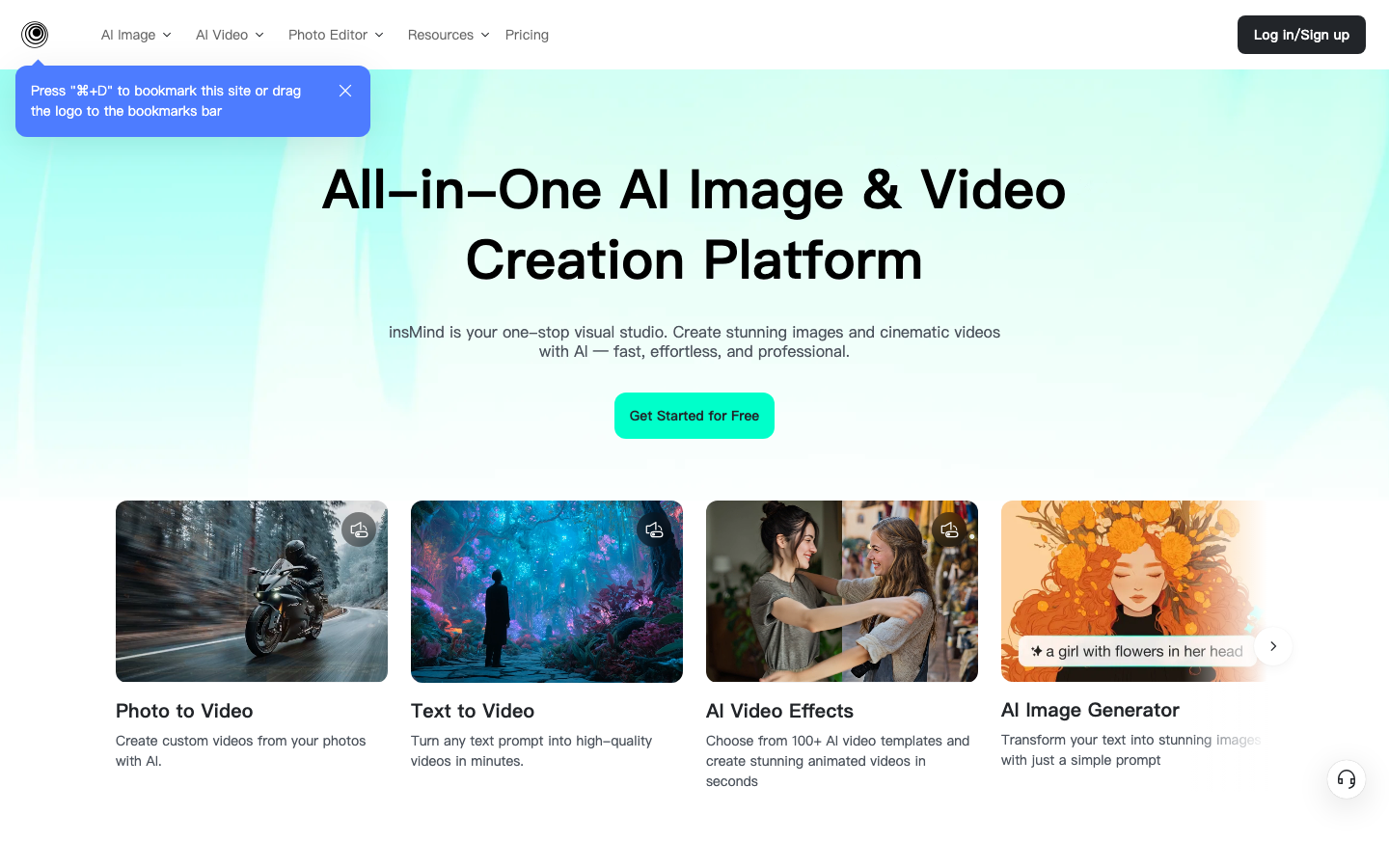
insMind is a one-stop AI image and video creation platform launched by Gaoding for the global market. It integrates 15+ tools such as AI video generation (connected to Kling AI model), AI picture editing (background removal, image enhancement, AI expansion, magic eraser), AI image generation, AI avatar generation, etc. 1M+ active users, 4.9 user rating, covering e-commerce, content creation, commercial marketing and other scenarios.
insMind
Core parameters and statistics of insMind
insMind has been upgraded from a single AI picture editing tool to a one-stop AI image and video creation platform. Its core proposition is "All-in-One Visual Studio" - integrating picture editing, video generation, and image creation into the same browser tab. Users do not need to switch back and forth between Photoshop, editing, and Midjourney.
| Project | Specifications |
|---|---|
| Product positioning | One-stop AI image and video creation platform |
| Producer | Gaoding |
| Target Market | Global Market |
| Active Users | 1M+ |
| User Rating | 4.9 / 5.0 |
| Video generated | 3M+ |
| Pictures generated | 10M+ |
| Total number of integrated tools | 15+ AI tools |
| AI video model | Kling AI, etc. |
| Usage form | Web online platform |
| Free model | Limited free quota + subscription system |
Positioning change: When launched in 2024, it will focus on "AI picture editing" (cutting out, enhancement). By 2026, it has expanded into a comprehensive platform covering 15+ tools such as AI video generation (connected to Kling AI), AI image generation, AI avatars, magic eraser, etc. It is included in application recommendation channels such as Google, Apple, and ProductHunt, and has been reported by technology media such as Windows Report, GEEK, and MSPowerUser.
Boundary Description: Still focusing on medium and light visual content production scenarios - e-commerce main images, social media materials, and corporate promotional images. Complex film-level video production and high-precision professional synthesis still require professional tools.
users and market recognition of insMind
The market data of insMind has been publicly available on the official website and is no longer undocumented.
Core User Data:
- 1M+ active users - covering five major groups: e-commerce sellers, content creators, business owners, graphic designers, and individual users
- 10M+ image generation——The cumulative processing level has exceeded 10 million
- 3M+ video generation——AI video function has grown rapidly since its launch
- 4.9 / 5.0 User Rating – extremely high user satisfaction among AI vision tools
Media and platforms included:
- Included and recommended by mainstream platforms such as Google, Apple, ProductHunt, etc.
- Covered by international technology media such as WindowsReport, GEEK, IT-CONNECT, MSPowerUser, pplware, etc.
User reputation: In the user feedback displayed on the official page, many paying users mentioned "a 30% increase in sales", "editing time cut in half", and "product pictures improved from amateur to professional level". Feedback from typical user John Smith: "AI Background gives product photography a completely new look, resulting in a 30% sales increase."
The cost advantage of insMind
insMind's pricing strategy is "free entry quota system + tiered subscription", covering the full spectrum from occasional personal use to enterprise high-frequency production.
| Plan | Monthly payment (converted to annual payment) | Total annual payment | Core benefits |
|---|---|---|---|
| Free | $0 | $0 | Limited basic features, watermarked, low resolution |
| Basic | $5.83/month | $69.99/year | 1000 points/month, about 100 pictures/40 videos, no watermark, HD download, batch editing |
| Pro | $25.00/month | $299.99/year | 5000 points/month, about 500 pictures/200 videos, unlimited background removal |
| Ultra | $100.00/month | $1,199.99/year | 30,000 points/month, about 3,000 pictures/1,200 videos, full set of features |
Three-tier cost analysis:
- C-side/Personal: The free version is enough for occasional processing; the Basic version ($5.83/month) is comparable to Canva Pro ($12.99/month), and the price is about 45% of it
- Content Creator/Freelance: Pro version ($25/month) is suitable for high-frequency production, including a monthly quota of 500 pictures + 200 videos
- Enterprise/Team: Ultra version ($100/month) is suitable for e-commerce teams that require large-scale batch processing, and the cost of a single image is about $0.033
Competitive product price: Compared with Canva Pro ($12.99/month, without AI video generation) and Adobe Firefly ($4.99/month, 100 generation points), insMind Basic covers both image editing and video generation at $5.83/month, which is outstanding in its price/performance ratio among similar products.
Main functions of insMind
insMind has been upgraded from a simple "picture editing" to a complete visual platform including videos, pictures, and image generation. The following is organized by competency area:
AI video generation (new core capabilities in 2026)
- Text to Video: Enter text description to directly generate a short video
- Image to Video: Upload static images to generate dynamic videos, suitable for product display
- 100+ Video Templates: Apply templates with one click to quickly produce social media short videos
- Kling AI model integration: Connect to Kuaishou’s open source Kling video generation model to improve video quality and action coherence.
AI picture editing (basic ability matrix)
- AI Background Remover: Remove/replace background with one click, batch processing support
- AI Image Enhancer: Lossless amplification of resolution, suitable for print-level output
- AI Image Expander: AI image expansion (Outpainting), expanding the screen boundary
- AI Magic Eraser: Erase unnecessary elements in the screen
- AI Replace: After selecting the area, AI replaces it with the specified content
- AI Background: Generate high-resolution AI background based on prompt words
AI image generation
- AI Image Generator: Generate images from text descriptions
- AI Photo Effects: One-click stylized effects (sketch, cartoon, watercolor, etc.)
- AI Headshot Generator: Convert selfie to professional avatar
Functional synergy
The above functions are not isolated - users can use them in series in one workflow: upload product images → remove background → AI enlarge image to adjust composition → AI enhance image quality → generate video display → publish with one click. All done within insMind, no need to export to other software.
Model and version evolution of insMind
| Stage | Approximate time | Key changes |
|---|---|---|
| Launch | ~2024-Q2 | Launched as an AI image editing tool, focusing on background removal and image enhancement |
| Function expansion period | 2024-2025 | Gradually add AI image generation, stylized filters, and magic eraser |
| Video upgrade | ~2026 | Online AI video generation capability, access to Kling AI and other video models, total number of tools exceeds 15+ |
| Current form | 2026 | Positioning upgraded to "All-in-One AI Image & Video Creation Platform" |
The official unified version number system has not been disclosed, and the actual iteration runs according to the continuous update mode of the online platform.
insMind’s technical advantages
insMind's technical route can be summarized as "model integration + workflow integration + one-click packaging":
- Multi-model integration: Image editing capabilities are based on a self-developed image processing pipeline; video generation is connected to third-party open source/commercial models such as Kling AI, and "one input, multiple models are available" through a unified back-end scheduling layer.
- Workflow concatenation: The core architecture supports cross-tool state maintenance - the user's background removal results can be directly passed to AI image expansion without repeated uploading.
- One-click packaging: Hide all complex model inference parameters (CFG Scale, Denoising Strength, ControlNet conditions) to the backend, and only expose the "Effect/Strength" slider on the frontend, lowering the threshold for use.
Engineering Tips: In batch processing scenarios, it is recommended to test the processing quality of a single image first and confirm that the edge accuracy and image quality meet the standards before executing in batches to avoid wasting points.
insMind product pricing
| Plan | Monthly fee (annual payment converted) | Total annual payment | Monthly points | Picture quota | Video quota | Watermark |
|---|---|---|---|---|---|---|
| Free | $0 | $0 | Limited | Limited | Limited | Watermarked |
| Basic | $5.83 | $69.99 | 1,000 | ~100 pieces | ~40 pieces | No watermark |
| Pro | $25.00 | $299.99 | 5,000 | ~500 pictures | ~200 pieces | No watermark |
| Ultra | $100.00 | $1,199.99 | 30,000 | ~3,000 pieces | ~1,200 pieces | No watermark |
Points Mechanism: Points paid monthly are valid for the month and do not accumulate. Points are issued monthly for annual payments and are also valid for the same month. One-time points packages (valid for 2 years) are available for additional purchase.
Refund Policy: Any points not used within 7 days of purchase may be refunded. Supports PayPal and Visa/Mastercard/Amex/JCB credit cards.
Application scenarios of insMind
-
E-commerce product image production: batch cutout and background change + AI enhancement + product display video, all covered by one platform. Typical process: Upload 50 product images → remove the background in batches → replace with a unified scene background → AI enhances the image quality → generate a 15-second display video. Key points for verification: Whether the edge accuracy of the cutout (especially hair and transparent objects) meets the requirements for listing.
-
Social media content creation: Use AI image generation to produce visual materials + AI video templates to quickly create short videos. Key points of verification: Size adaptation of generated content on different platforms (insMind supports multiple format output).
-
Corporate Brand Visual Management: Use AI Background to generate a unified style brand background, and use AI avatar generator to unify team member LinkedIn avatars. Key points to verify: The style consistency of multiple pictures generated continuously.
-
Independent Developer/Freelance: Use AI to replace the cost of outsourcing design, and one person can complete a complete set of visual delivery from pictures to videos. Hidden benefits: Reduce communication rework costs with external parties.
Applicable groups of insMind
- E-commerce seller: It is necessary to process product images at high frequency, and cutting out images in batches and changing the background is a necessity. The Basic version ($5.83/month) can cover medium-sized stores.
- Content Creator/Social Media Operator: Need to quickly produce multiple pieces of visual material. The 200 videos/month quota of the Pro version ($25/month) is suitable for creators who update 3-5 short videos per week.
- Graphic Designer (Auxiliary Tool): Use AI to accelerate basic operations such as cutting out and expanding images, freeing up time for the creative process.
- Personal User: Occasionally need to process ID photos and travel photos. The free version is sufficient for light use.
Does not fit boundaries:
- Scenarios that require highly customized original visual design (pure AI-generated stylization is not unique enough)
- Professional film and television-level video production (time limit, insufficient camera movement control)
- Batch processing of enterprise-level needs exceeding 3,000 sheets/month (Ultra has an upper limit of 3,000 sheets/month, and additional points packages must be purchased for excess)
- For data privacy requirements that are extremely high (such as medical image processing), it is necessary to confirm whether cloud processing meets compliance requirements
insMind vs similar tools comparison
| Comparative dimensions | insMind | Canva Pro | Adobe Firefly | Clipdrop | Final design (domestic version) |
|---|---|---|---|---|---|
| Image editing | ✅ 15+ AI tools | ✅ Massive templates + editing | ✅ Generative fill | ✅ Background removal + enhancement | ✅ Templates + editing |
| AI Video Generation | ✅ Kling AI Integration | ❌ No native video generation | ❌ None | ❌ None | ❌ None |
| AI Image Generation | ✅ Text + Reference Image | ✅ Magic Media | ✅ Firefly Generation | ✅ Stable Diffusion | ❌ Limited |
| Monthly fee (minimum payment) | $5.83 | $12.99 | $4.99 | Pay-as-you-go | ¥30+ |
| Free quota | Limited basic functions | Limited templates + export | Limited points generation | Limited processing times | Limited templates |
| Target Markets | Global | Global | Global | Global | China |
| Batch Processing | ✅ Full Plan Support | ✅ Pro Plan | ❌ Limited | ❌ | ✅ |
| Video Templates | 100+ | Massive | ❌ | ❌ | Limited |
Decision Suggestion: If you only need image editing and enhancement, Adobe Firefly ($4.99/month) is more focused; if you need "design template + image editing", Canva Pro ($12.99/month) has a more mature ecosystem; if you need both image editing and AI video generation, insMind (starting at $5.83/month) is currently the most cost-effective two-in-one solution.
Summary and outlook of insMind
insMind has completed the evolution from "AI cutout tool" to "one-stop AI image and video creation platform" in two years. 1M+ active users, 4.9 ratings, and 10M+ image generation constitute its market-recognized basic base. The access to Kling AI video capabilities is its most important functional upgrade in 2026, allowing it to establish a differentiated positioning of "picture + video two-in-one" among competing products.
Current Limitations:
- The duration of AI video generation is limited (about 25 seconds), and long videos still need to be edited and spliced.
- The monthly points clearing system is not friendly to low-frequency users, and annual users do not accumulate points every month.
- All Web runs online, no offline client, strong network dependence
- The copyright ownership terms of the generated content are not transparent enough and need to be confirmed item by item before commercial use.
- Complex creative synthesis (such as multi-layer fine control) capabilities are not as good as professional tools such as Photoshop
- The free version has heavy watermark and low resolution restrictions, and the actual "free trial" available scenarios are narrow.
Purchase/Adoption Risk Assessment: For individual creators and small teams (<10 people), insMind’s Basic or Pro plans are extremely low-risk – the $5.83-$25/month investment is much lower than the Photoshop + Premiere subscription combination (~$55/month), and there is no need to purchase additional video generation tools. For teams with an average daily processing volume of more than 100 pictures/50 videos, it is recommended to use the free credit with a 7-day refund period for batch testing before adoption, focusing on verifying: (1) whether the edge accuracy of the cutout meets the e-commerce listing standards; (2) the commercial usability rate of AI video generation (no obvious distortion or artifacts in the picture); (3) whether the export resolution covers the requirements of each display space in the store. Overall, this is a tool that "spends little money and saves big money" - using the monthly fee of a meal to replace the repetitive work output of a junior designer + video editor.
Related tools:
Version Info
- insMind online version (current version) :It operates as a one-stop AI image and video creation platform, integrating 15+ tools such as AI video generation (Kling AI), picture editing, and image generation, covering 1M+ active users around the world. The official unified version number has not been disclosed, and there is no official precise date yet. It is recorded according to the current online form.
- Launched for the global market :insMind is launched as an AI image editing tool for the global market, providing core capabilities such as background removal and image enhancement, laying the foundation for subsequent expansion into a comprehensive visual platform. There is no official precise date yet, it is recorded according to the public collection time.
User Reviews